// SERVICEM8 BACKUP
ServiceM8 backup: your entire job history in Google Drive
ServiceM8 backup, done for you: every completed job in your ServiceM8 account archived into a Google Shared Drive your business owns, job details and internal notes as a readable Doc per job, photos and videos as original files. We backfill the lot, then every new completed job archives itself within 15 minutes. Built by a ServiceM8 Bronze Partner.
// THE GAP
ServiceM8 has no export-everything button
ServiceM8 does have a native backup: Settings, then Download account backup. It is a one-off manual download, unstructured, and it does not update itself. The Attachment Download add-on pulls files one job at a time into a zip, free for only the first five attachments per job. And the Advanced Reporting Pack exports your job history as CSV lists, which is fine for numbers but useless for photos, videos and notes. We break each of those routes down, and the documented limits on them, in our guide to every way to export data from ServiceM8.
None of that gives you what most trade businesses actually want: all of it, automatically, forever, in an account you own, in a shape your office, your other platforms and your AI tools can actually use. That is the gap this service fills. One flat, searchable archive of every completed job, kept current without anyone in the office touching it.
// HOW IT WORKS
How the ServiceM8 backup works
The system runs on n8n that we host and maintain, so there are no per-task Zapier fees and you are not renting your own archive back from a SaaS platform. It is four workflows sharing the load; here is what they do to your job history.
A backfill workflow chews through every historical completed job, batch by batch, retry-safe from the first job to the last.
Job details and the full note history become a Google Doc. Photos and videos are copied out as the original files.
A watcher checks every 15 minutes and archives each newly completed job automatically. Zero admin, forever.
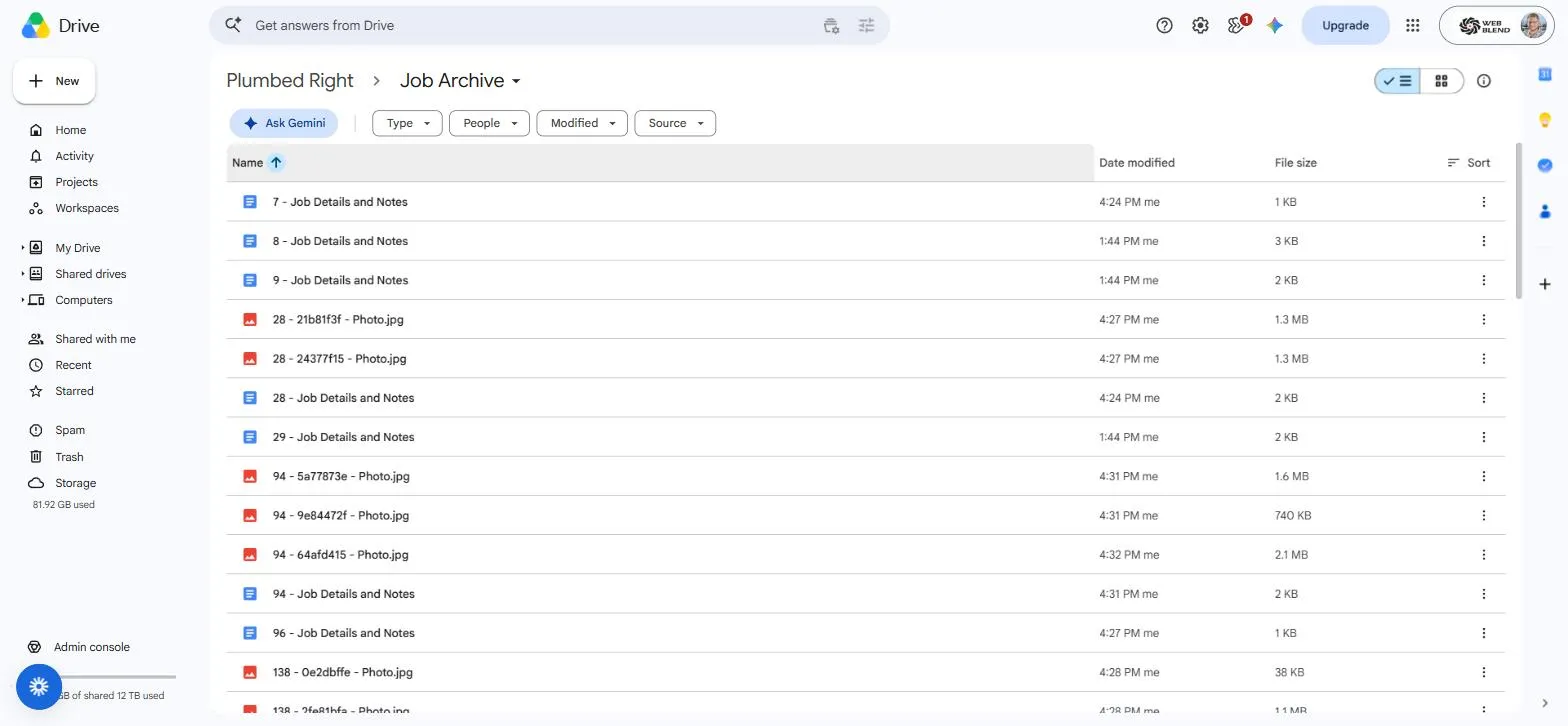
No folder maze. Type a job number into Drive search and the details Doc and every photo and video come back in one hit.
// WHAT GETS ARCHIVED
What gets archived, and what stays out
This is also how you finally export photos from ServiceM8 in bulk: thousands of job photos and videos copied out as original files, without anyone opening job cards one at a time.
Goes into the archive
- Job details and the full internal note history, in date order, as one readable Google Doc per job.
- Every job photo as the original file, not a compressed copy or a screenshot.
- Every job video as the original file, however large.
- Every filename prefixed with the ServiceM8 job number, so Drive search brings back the whole job in one hit.
Excluded on purpose
- Invoices. They already live in ServiceM8 and your accounting software.
- Quotes. Same reason.
- PDFs and generated paperwork. Nobody needs a second copy of a form letter.
The archive is for the work, not the paperwork.
// THE MISSING FEATURE
Can you archive old jobs in ServiceM8?
No. ServiceM8 has no archive feature for jobs. A completed job either stays on its job card forever or gets deleted, and deleting a job takes its photos, videos and notes with it. There is no middle option, which is why tradies asking how to archive old jobs in ServiceM8 keep hitting docs about archiving materials instead. The two manual options ServiceM8 does document, and what each one is actually good for, are set out on our page on archiving old jobs in ServiceM8.
This build is the missing archive button. Old jobs stay safe in ServiceM8 if you want them there, and a complete copy of every one of them lives in a Drive you own: seven years of job records for licensing and warranty purposes, findable by job number in seconds.
// BUILT NOT TO BREAK
Read-only by design, with three layers against duplicates
The automation holds a read-only ServiceM8 API key. It can copy your data out, and it can never change, delete or lock a job. On the Drive side, three layers keep the archive clean no matter what fails.
Each workflow only advances its bookmark after a fully successful run, so a failure means a retry, never a gap in your history.
Every filename is predictable, so the archiver asks Drive whether the exact file already exists before creating anything. Re-runs change nothing.
A nightly check groups identical names, keeps the oldest copy and moves any newer duplicate to Drive's trash. Nothing is ever permanently deleted.
// REAL BUILD, REAL NUMBERS
Proven on more than 5,000 real jobs
This is not a concept page. The system described above is running today for Plumbed Right, a plumbing client whose website and Google Ads we also look after, archiving their entire completed-job history.
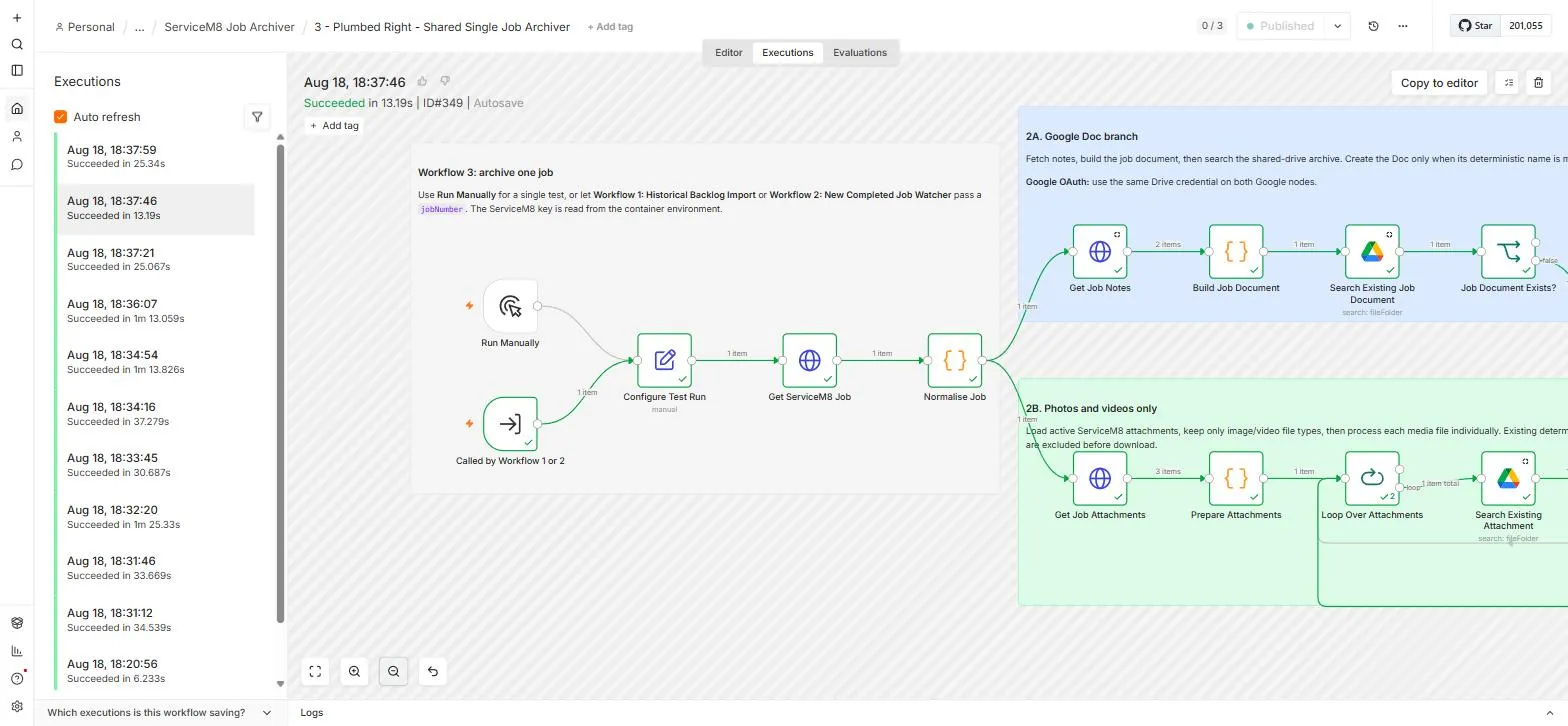
Before launch we ran a verified live test on 10 completed jobs: 10 job-detail Docs created, 37 photos and videos uploaded, every PDF correctly excluded, zero duplicates. The full build, including the four workflows and the pacing decisions, is written up in the Plumbed Right archive case study.
A ServiceM8 job card next to the same job's files in Drive, so you can see exactly what gets copied across.
Typing a job number into Drive search and watching the whole job come back: the Doc, the photos, the videos.
// WHO IT'S FOR
Who this is for
Businesses keeping seven years of records
Warranty disputes, insurance claims and licensing obligations all come down to whether you can produce the record. A searchable archive you own answers that in seconds, not an afternoon of clicking through job cards.
Offices with photos buried in job cards
Years of before-and-after photos and site videos, filed one job card at a time. The archive puts all of them in one place, findable by job number, so the team can browse years of their own photos in seconds: for quotes, disputes and showing off good work.
Anyone cancelling ServiceM8
Leaving ServiceM8? Archive everything first. The Drive copy is complete and independent, so your job history survives the subscription. We are not here to talk you out of ServiceM8; we are here to make sure your data is yours either way.
Businesses that want their job data working for them
ServiceM8 stays your job system; the archive gives you the raw material. AI can search the whole history and draft blog posts, case studies and quote answers from jobs you actually did, and because it is plain files and Docs in your own Google account, the data works on any platform you use next.
// PRICING
One fixed number, scoped before we start
Every backup build is quoted as a fixed price, scoped on your completed job count and media volume before any work starts. ServiceM8 Drive builds start from $1,800 + GST; a full historical backfill is scoped on top of that. No hourly billing, no lock-in contract, and because the system runs on n8n we host, no per-task automation fees eating the value afterwards.
Only want new job photos filing themselves as work is completed, without the historical backfill? The smaller ongoing photo sync build covers that. For everything else we wire around ServiceM8, see ServiceM8 automation setup.
// QUESTIONS
Straight answers before you ask
Not sure whether your job history is big enough to bother, or whether the native backup already covers you? Ask us directly and we'll give you a straight answer, no jargon, no pressure.
Get in touchDoes the backup slow ServiceM8 down?
No. The archiver reads ServiceM8 through its API in small, deliberately paced batches, roughly one job per minute during the backfill, and it holds a read-only key, so it can never change, delete or lock a job. Your team keeps using ServiceM8 exactly as they do now and will not notice it running.
What happens to invoices and quotes?
They are excluded on purpose, filtered out before anything is even downloaded. Your paperwork already lives in ServiceM8 and your accounting software; the archive is for the work: job details, internal notes, photos and videos. In the Plumbed Right build that meant 15,367 PDFs correctly kept out of the archive.
Can it archive into my own Google account?
Yes, that is the whole point. The archive lands in a Google Shared Drive your business owns, under your own Google Workspace or Google account. You are not renting your own job history back from us or from any platform, and the archive stays yours whatever software you run in the future.
What happens to new jobs after the backfill?
A watcher workflow checks ServiceM8 every 15 minutes for newly completed jobs and archives them automatically: details and notes into a Google Doc, photos and videos as original files. Once the historical backfill finishes, the system just keeps running with zero admin from your office.
How long does a historical backfill take?
Days, not hours, and that is deliberate. The backfill is paced at roughly one job per minute, around 1,440 jobs per day, because video-heavy jobs take time and rushing an archive is how duplicates happen. A 5,000-job history typically completes inside a week, and the watcher is live from day one so no new job is ever missed while the backfill runs.
What does it cost?
A fixed quote, scoped on your completed job count and media volume before any work starts. ServiceM8 Drive builds start from $1,800 + GST; a full historical backfill is scoped on top of that. One number, no hourly billing, no lock-in contract, no per-task automation fees afterwards.
Is this an official ServiceM8 add-on?
No. It is a custom system built on the ServiceM8 API by us; Web Blend is a ServiceM8 Bronze Partner. The automation holds read-only API access, so it can copy your data out but can never change or delete a job, and nothing about how your team uses ServiceM8 day to day changes.
// READY WHEN YOU ARE
Get your job history somewhere you can search it
Tell us roughly how many completed jobs are sitting in your ServiceM8 account and we'll come back with a fixed price for archiving every one of them. No pressure, no jargon.
Get a quote