
Every enquiry from a Web Blend site arrives with the whole story of the visit: where the person came from, what they read, how long for, on what device, and what our calculators told them. It only counts as a lead once delivery is confirmed, and it lands in whatever system you already run.
- The lead email carries traffic source, first visit, page journey with time on each page, device, click IDs and calculator results.
- The visit record is first-party, kept in the visitor's own browser, never read by ad or analytics tools, and only attached on send.
- Required fields are validated in the browser with inline errors, so a blank form can never become a blank job in your job system.
- A lead counts only when the delivery service confirms it, and the thank-you page counts once, so a refresh never creates a phantom lead.
- Exit offers appear only as someone leaves, one per page family: a plan with three fields at most, or a link to the paid audit, never on the contact form.
- The same fields reach GoHighLevel, ServiceM8, Tradify, simPRO or email. On watched forms, two backups and a silence alert cover a failed destination.
Keep asking about it in
Quick answer: a form on a Web Blend site does not send you a name and a phone number and leave you guessing. Every enquiry arrives with the story of the visit attached: where the person came from, which pages they read and for how long, what device they were on, whether they clicked an ad, and what our free calculators told them before they wrote to you. It is validated before it leaves the browser, it only counts as a lead once the delivery service confirms it, and it lands in the system you already run, whether that is ServiceM8, GoHighLevel, Tradify, simPRO or plain email.
What arrives in the email?
Every lead form on the site, from the contact page to the calculators to the exit offers, is stamped with the same hidden fields the moment the visitor presses send. Here is what each one means.
Where they came from. traffic_source is the plain-English origin of the first visit: “Google (organic search)”, “Google Ads (paid)”, “ChatGPT (AI assistant)”, “Email (Gmail)”, “Referral: somesite.com.au” or “Direct or typed URL”. If a later visit came from somewhere different, last_touch_source shows that too, so you can see a person who found you on Google last month and came back through a Facebook post today. first_referrer is the raw address of the site that first sent them, when there was one.
When they first showed up. first_visit is the date and time of their first visit, first_page is where they landed that day, visits is how many separate visits they have made, and days_since_first_visit appears when it is more than zero. Five visits over 18 days is someone who has been thinking about it. One visit and eight minutes on site is someone who decided today.
What they read this visit. current_page and page_title are where they were when they sent the form. time_on_page, pages_this_visit and time_on_site are what they sound like. journey is the piece most clients read first: a numbered list of the pages in the order they were read, with time on each. If they visited before, previous_visits_pages lists what they read on earlier visits.
What they were using. device reads like “Mobile, iPhone, Safari, 390x844”. timezone, local_time and language tell you the person is in Darwin at 7:40 in the evening, which decides whether you ring back now or in the morning.
Whether an ad brought them. If the visit that led to the enquiry came from an ad, the click identifier is on the lead: gclid, gbraid or wbraid for Google Ads, fbclid for Meta, msclkid for Microsoft, ttclid for TikTok, plus any utm_source, utm_medium, utm_campaign, utm_term and utm_content tags, and landing_page for the page that click landed on. This is the last paid click, which matches how Google attributes conversions itself.
What the calculators told them. tool_results is a one-line summary of any free tool they used, for example “Missed-call calculator: about $54,600/yr lost to missed calls (104 jobs)”.
A reference. lead_id is a unique identifier so a lead can be matched between the email and the CRM if you ever need to trace one.
Empty fields are never sent. Someone who typed your address in, read one page and filled in the form produces a short email, not twenty blank rows. Here is a realistic example.
Subject: New enquiry from webblend.au

name: Dave Morrison
email: [email protected]
phone: 0412 345 678
service: Automation
message: I used your missed-call calculator and it looks like I am losing
  about $54,600 a year (104 jobs) to missed calls. I would like a plan to fix that.

traffic_source: Google (organic search)
first_visit: 3 Sep 2026, 8:12 pm
first_page: /missed-call-text-back-for-tradies/
visits: 2
days_since_first_visit: 7
current_page: /contact/
page_title: Contact Web Blend
time_on_page: 1m 02s
pages_this_visit: 3
time_on_site: 3m 57s
journey: 1. /tools/missed-call-calculator/ (2m 10s)  >  2. /services/automation/ (45s)  >  3. /contact/ (1m 02s)
previous_visits_pages: /missed-call-text-back-for-tradies/ (3m 20s), /servicem8/ (1m 05s)
device: Mobile, iPhone, Safari, 390x844
timezone: Australia/Darwin
local_time: 10 Sep 2026, 7:41 pm
language: en-AU
tool_results: Missed-call calculator: about $54,600/yr lost to missed calls (104 jobs)
lead_id: 3f6c1a2e-9b4d-4c7e-8a1f-2d5e6b7c8d9e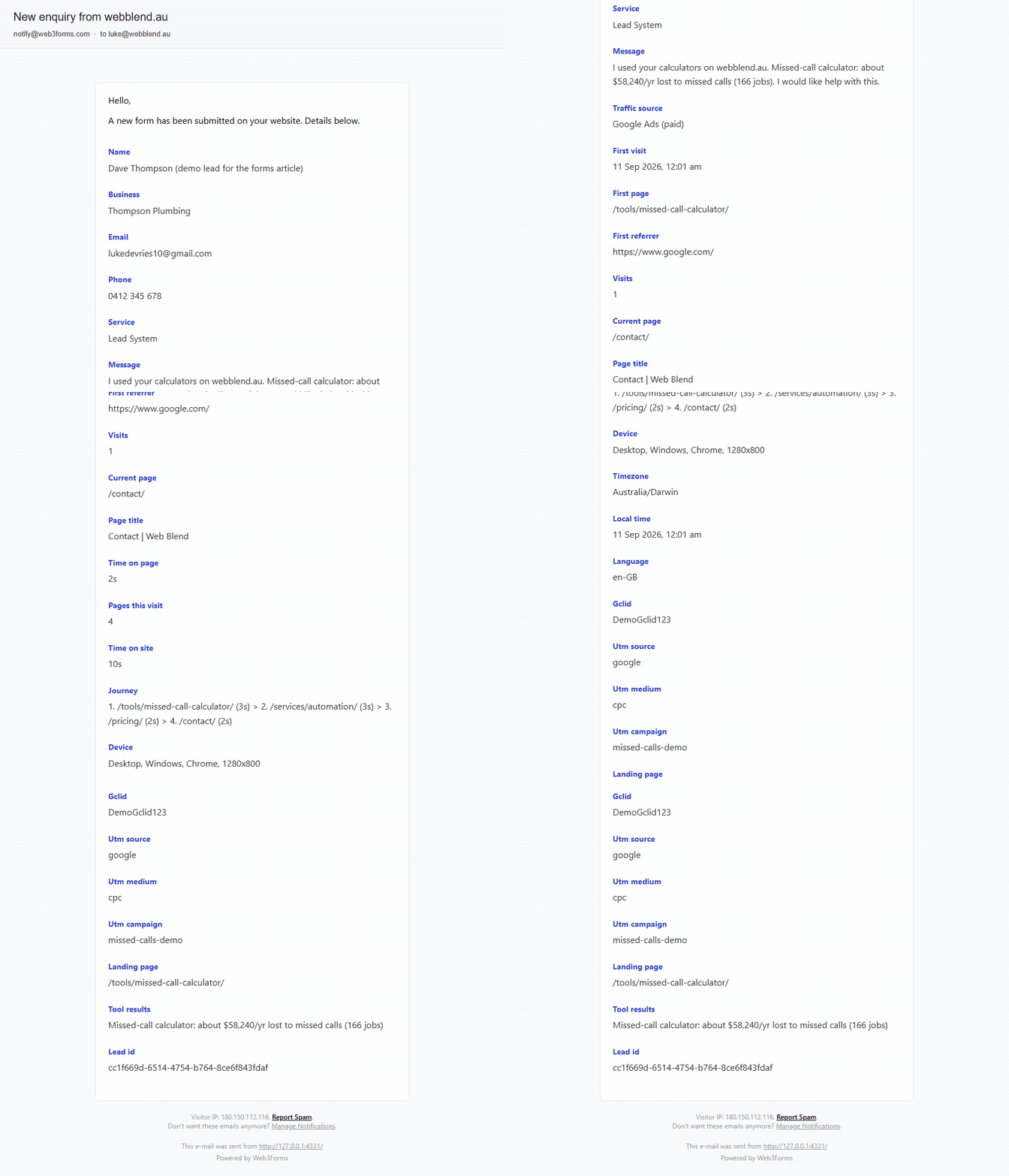
Is this tracking people around the internet?
No. The record is first-party. It lives in the visitor’s own browser storage, it is only about their visits to that one website, and it is not sent anywhere while they browse. No advertising or analytics tool reads it. It leaves the browser once, when the visitor presses send on a form, and it goes to you and nobody else. It expires after 90 days of inactivity, and the visitor can clear it at any time by clearing the site’s data.
Visitors in Europe get a memory-only version, so nothing is kept between pages until they accept the analytics notice. The full stance is on our privacy policy, and the field list in this post is the one that page links to.
What happens when someone uses a calculator?
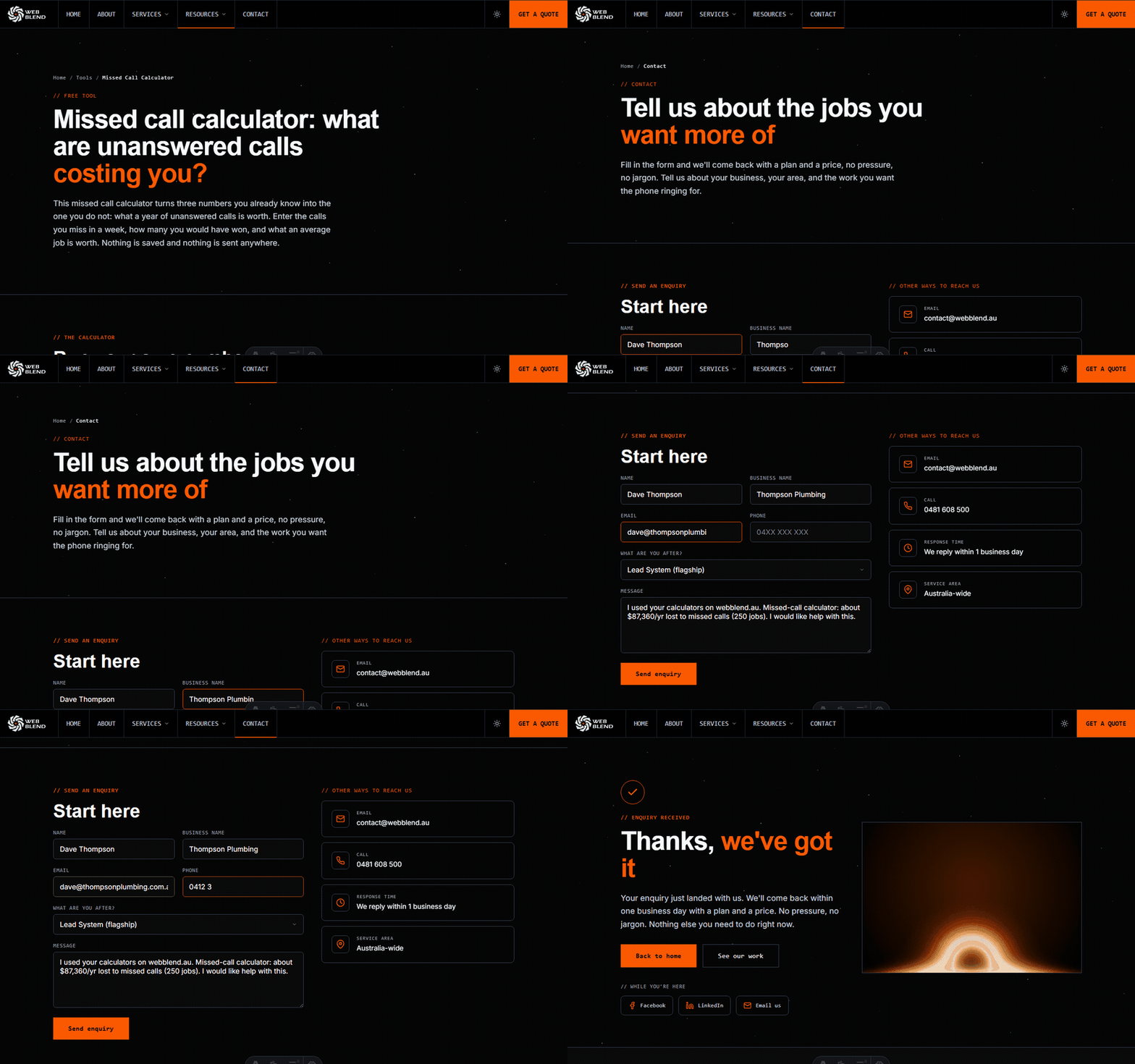
There are eight free tools on the tools page: missed-call, speed-to-lead, review, charge-out rate, hipages cost and quote win-rate calculators, plus the website speed check and the AI visibility check. Each one writes its live result into its “get a plan” link as the visitor moves the sliders.
The site watches that link and records the result. If the visitor clicks through to the contact page, the message box is prefilled with their own numbers: “I used your missed-call calculator and it looks like I am losing about $54,600 a year (104 jobs) to missed calls. I would like a plan to fix that.” The service dropdown is set to match. And whichever form they eventually fill in, including an exit offer on a different page, carries the result in tool_results. A person who ran the calculator on Tuesday and enquired on Friday still arrives with the number.
Clients can see the same tools and what each one feeds through on the wiki tools page.
How do you know a lead is real?
A lead system is only as good as its worst week, so most of the work here is in what does not happen.
Nothing blank ever leaves the browser. Required fields are validated in the browser with inline errors before anything is sent. That sounds too basic to mention, but we once audited a site where a validation attribute combined with a submit script let the form post with nothing in it. Every empty submission became a job in the client’s job system, for weeks. That is why we test for it on every form we ship.
A lead counts only when delivery is confirmed. The delivery service we use, Web3Forms, returns a success code even for posts it quietly drops as spam or because a honeypot was ticked. So the form reads the answer, not just the status. If the post was not accepted, no lead is recorded, no conversion fires and nothing is pushed to your CRM. The bot sees the same thank-you page as everyone else and learns nothing.
A conversion is counted once. When a lead is confirmed, the form leaves a short-lived note in the browser and sends the visitor to the thank-you page. That page reads the note, reports the conversion, and clears it. Refreshing, bookmarking or typing the address in later creates nothing, so your Google Ads and analytics numbers stay honest.
If the network drops mid-send, the enquiry still goes. The form sends in the background so it can read the delivery answer. If that request fails, it falls back to a plain browser post to the same address. The visitor might see a plainer thank-you page, but you still get the lead.
Exit offers: the last question before someone leaves
Some pages show a short offer when a visitor is about to leave. It is easy to do this badly, so the rules are strict.
It never appears on page load. On desktop it appears when the mouse heads for the tab bar, and only after at least 12 seconds on the page. On a phone it appears when someone flicks back up fast after reading past halfway. Both are what a person does after reading the page, not on arrival.
There is one offer per page family, and it asks for the thing that page was about. Website and Google Ads pages point to our paid $290 + GST Website & Ads Audit instead of a free review, because a review of your own site or ads is what that audit is. Reviews pages offer a 90-day review plan. Job software pages, covering ServiceM8, Tradify and simPRO, offer an automation map for whatever the visitor runs. Directory pages about hipages or Oneflare offer a replacement plan for that spend. Every plan is fulfilled by a person at Web Blend, usually within a business day, never by an instant download.
The form has three fields at most: name, email and the one thing that makes the fulfilment possible, such as a website address. It shows once per session, stays away for seven days after someone closes it, and never appears again after someone submits one. It never shows on the contact form, the thank-you page, the paid landing pages or the client wiki, because a pop-up on a page where someone is already converting would interrupt the conversion.
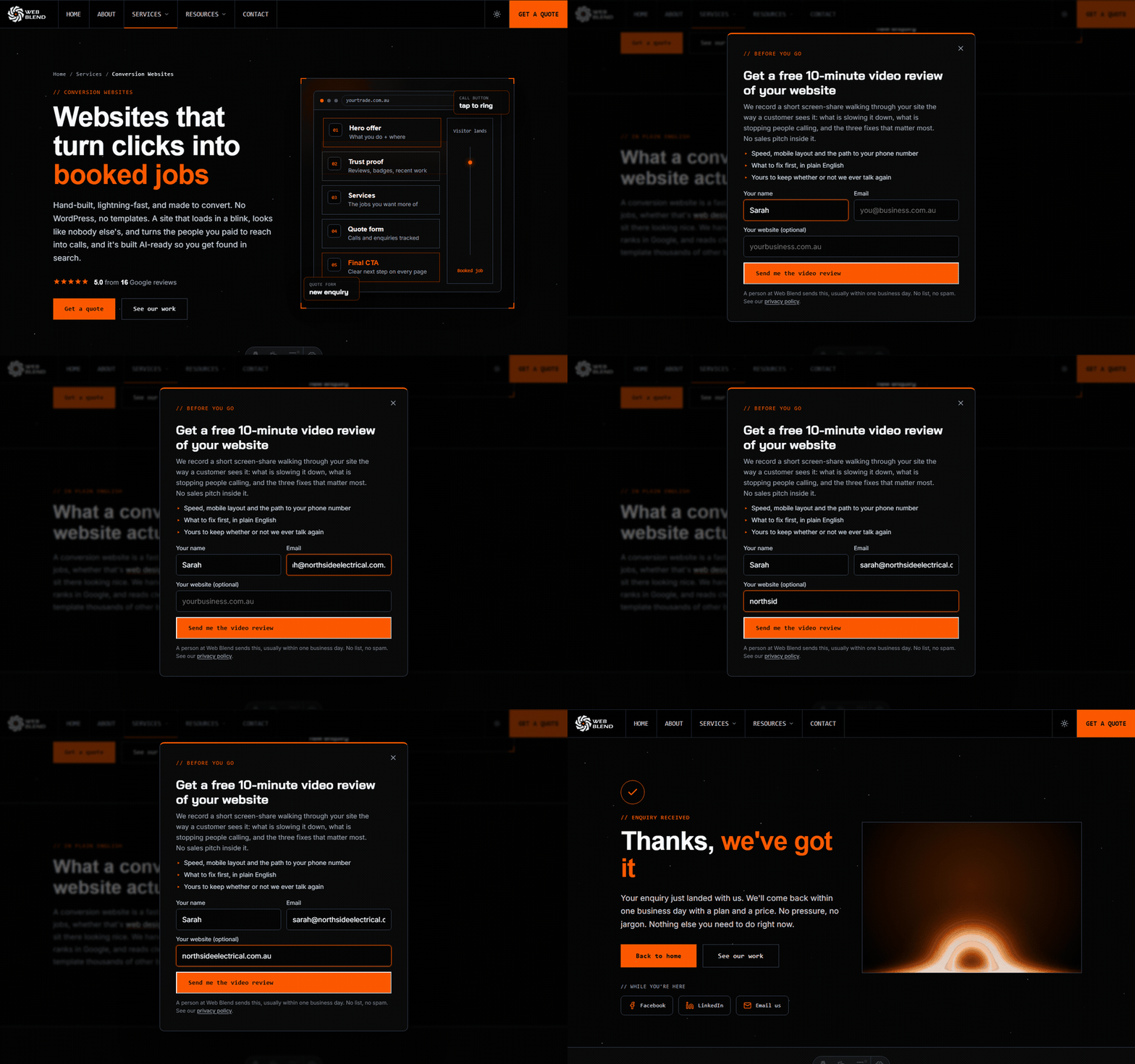
It works. On a client electrical site we launched with the same pattern, the exit offer produced a real enquiry the day it went live.
Where does the lead go?
The same fields reach every destination, so nothing is lost between the email and your job system.
Email, always. Web3Forms delivers the notification with the fields in the order they were sent: the visitor’s details and message first, the visit context last. That is the email in the example above.
GoHighLevel. Every field is pushed through a same-origin endpoint on the site, so a GoHighLevel workflow can map any one of them: missed-call text-back, quote follow-up, a pipeline stage based on the service they asked about, or a tag from the calculator result. See GoHighLevel for tradies for what we build there.
ServiceM8. The lead can arrive as a new job through ServiceM8’s inbox email, with the customer name, phone, email and address mapped to the job. One detail worth knowing: ServiceM8 only reads a field code when it sits at the start of a line, so we make sure every code starts on its own line rather than trusting the email client to wrap it. Our ServiceM8 page covers the rest.
Tradify and simPRO. Both take the lead through their inbox addresses, so the enquiry lands where your jobs already live.
Google Ads. Because the click identifier travels with the lead, you can import offline conversions back into Google Ads once a job is quoted or won. That tells Google which clicks became paying work, not just form fills. We wrote up how that works in ServiceM8 Google Ads conversion tracking.
Where does the lead go if one destination fails?
A delivered check proves the enquiry left the website. It cannot prove your inbox, your job system or your CRM kept it. So on the forms we watch, every enquiry goes to three places:
- Your job system, ServiceM8, GoHighLevel or whatever you run.
- A row in a spreadsheet, so there is a list you can count.
- An email to an inbox you actually watch.
Then an automation watches for silence. If no enquiries arrive for a set period, for example 3 days, we get an alert and we test the form. A form that stops sending produces no error anywhere, so silence is the only signal there is.
More on that: contact form monitoring, and what to do if yours has already stopped working.
What this means for you
If you are choosing who builds your site, ask them what their contact form sends you, what happens when a bot submits it, and how they know a lead was actually delivered. If the answers are “a name and a number”, “not sure” and “we assume so”, that is the gap this post describes.
If you are already a client, the fields under the message are there so you can ring back with the right answer first time. A lead who spent three minutes on the missed-call calculator wants to talk about missed calls.
Want this on your site? See what is included in the Lead System, or get in touch and the form will show you exactly what we mean.