// SERVICEM8 PHOTO EXPORT
ServiceM8 photo export
ServiceM8 photo export has no bulk button. The account backup carries your attachments but runs once a day and cannot be imported back, and the add-on that zips photos works one job at a time. Here is what each route gives you, and what a whole history looks like once it is out.
// WHAT SERVICEM8 DOCUMENTS
What ServiceM8 gives you for photos
Three documented routes, all of them manual, checked against ServiceM8’s own help centre and add-on store on 18 August 2026. For the job and client records instead, see every export route and its limits.
The account backup: everything, once a day, reference only
One download of your jobs, clients, materials and documents, attachments included. Two documented conditions: it runs at most once every 24 hours, and ServiceM8 describes it as for reference only, so it cannot be imported into a new or separate ServiceM8 account.
SOURCE: Help Centre: How to download a backup of your ServiceM8 dataAttachment Download: one job at a time
The third-party Attachment Download add-on zips one job’s files on demand, free for up to 5 attachments per job with a paid tier beyond that. Fine for a handful of jobs. Slow going for a decade of them.
SOURCE: ServiceM8 add-on store: Attachment Download listingThe CSV reports carry no photos at all
The Advanced Reporting Pack’s Job List and Client List are text-only spreadsheet reports. ServiceM8 states they do not include files such as PDFs, photos or videos.
SOURCE: Help Centre: What is the Advanced Reporting Pack Add-on?// THE OTHER DIRECTION
Importing photos is not exporting them
Search this and the top result is usually ServiceM8’s guide to importing photos from the camera roll, up to 10 at a time. That is the opposite direction, and it is why the question feels unanswered: there is no matching document for getting a photo history back out.
Storage is not the constraint either. Every plan lists data storage as unlimited, so there is no ServiceM8 storage limit pushing you to clear photos out. Every documented limit is on the way out, not the way in.
// REAL NUMBERS
What a full photo export looked like on a real account
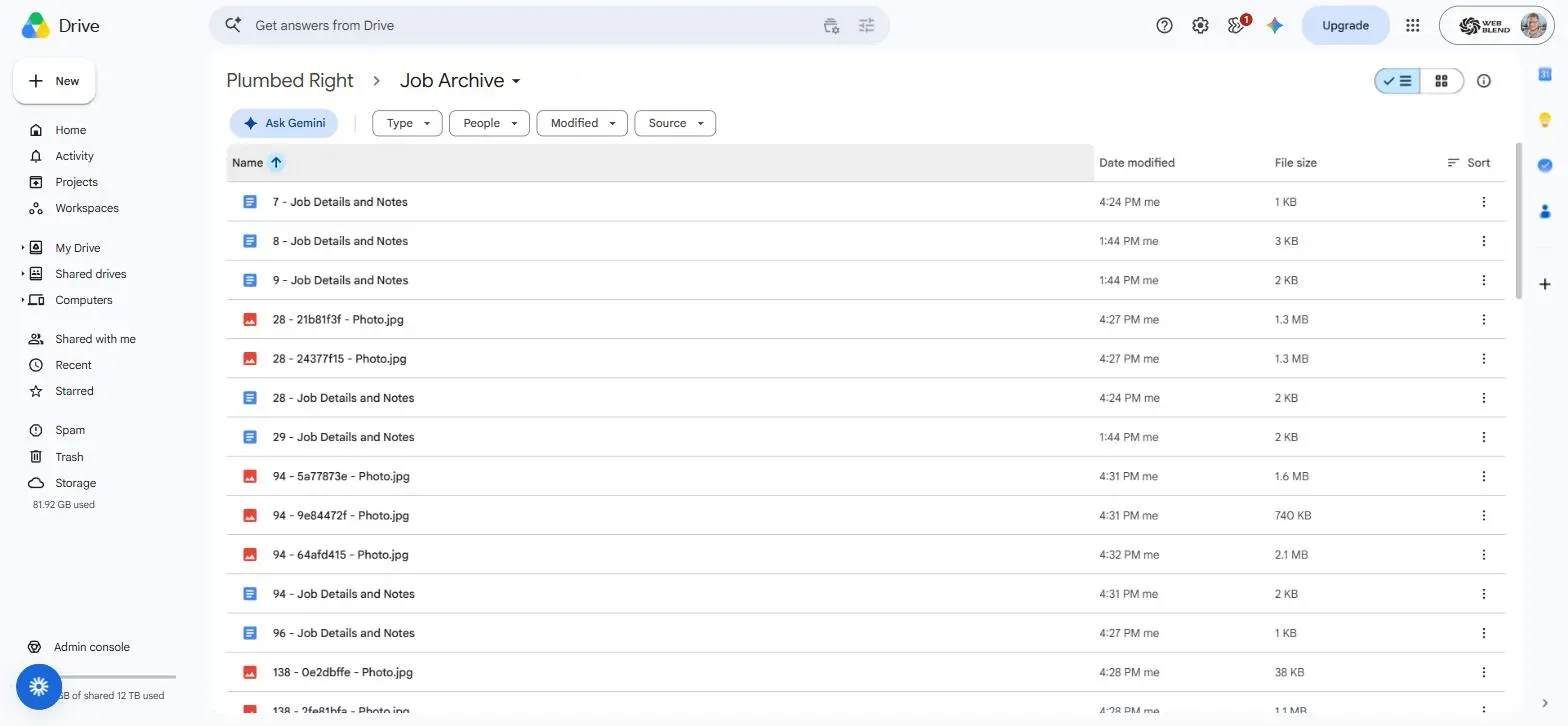
Plumbed Right had more than 5,000 completed jobs in ServiceM8. Cataloguing that history for backup counted 19,334 photos and videos, plus 15,367 PDFs deliberately excluded to keep the archive clean. Counts as at 18 August 2026, from the published ServiceM8 job archive case study.
- Every photo and video copied out as its original file, not a re-compressed thumbnail.
- Filenames prefixed with the job number, so a photo from 2019 is findable in 2029.
- Job details and notes saved beside them as a readable Doc per job.
- New completed jobs archived on their own within about 15 minutes.
// PICK ONE
Which route fits your account
A handful of jobs: the Attachment Download add-on, and keep your money.
One copy of everything, today: the account backup, remembering it is once a day and reference only.
Thousands of jobs, or a copy that stays current: an automated export through the official API into a Google Drive you own. That is our ServiceM8 backup build, one of several systems we build as a Bronze Partner. The rest are on the ServiceM8 services hub.
// QUESTIONS
Straight answers before you ask
Not sure whether the add-on covers you, or how many photos are actually sitting in your account? Ask us directly and we'll give you a straight answer, no jargon, no pressure.
Get in touchHow do I export photos from ServiceM8?
Three documented routes, none of them a bulk photo button. The account backup includes your attachments in a single download, at most once every 24 hours and for reference only. The Attachment Download add-on zips one job’s files at a time, free for up to 5 attachments per job. The CSV report exports carry no files at all. For a whole photo history, the practical route is an automated export through the ServiceM8 API into storage your business owns.
Can I bulk export photos and videos from ServiceM8?
Not with a single native button. The account backup is the closest thing, and it is a once-a-day, reference-only download rather than an ongoing copy. Anything beyond that is either the per-job add-on repeated by hand, or an automated export through the official API. On one real account, cataloguing the history for backup counted 19,334 photos and videos across more than 5,000 completed jobs, which is where doing it by hand stops being realistic.
Does the ServiceM8 account backup include photos?
Yes. ServiceM8 documents the account backup as including your documents and attachments alongside jobs, clients and materials. The catch is not what it contains, it is what you can do with it: ServiceM8 states the backup is for reference only and cannot be imported into a new or separate ServiceM8 account.
Will exporting photos delete anything in ServiceM8?
No, and our archive cannot delete anything even by accident: it reads through the official ServiceM8 API with a read-only key, so it can copy data out but can never change or remove a job. Worth knowing separately that deleting a job in ServiceM8 takes its photos, videos and notes with it, which is the usual reason people want a copy first. Web Blend is a ServiceM8 Bronze Partner.
// READY WHEN YOU ARE
Get the photos out once, then stop thinking about it
Tell us roughly how many completed jobs are in your ServiceM8 account and we'll come back with a fixed price for an archive that exports itself. No pressure, no jargon.
Get a quote