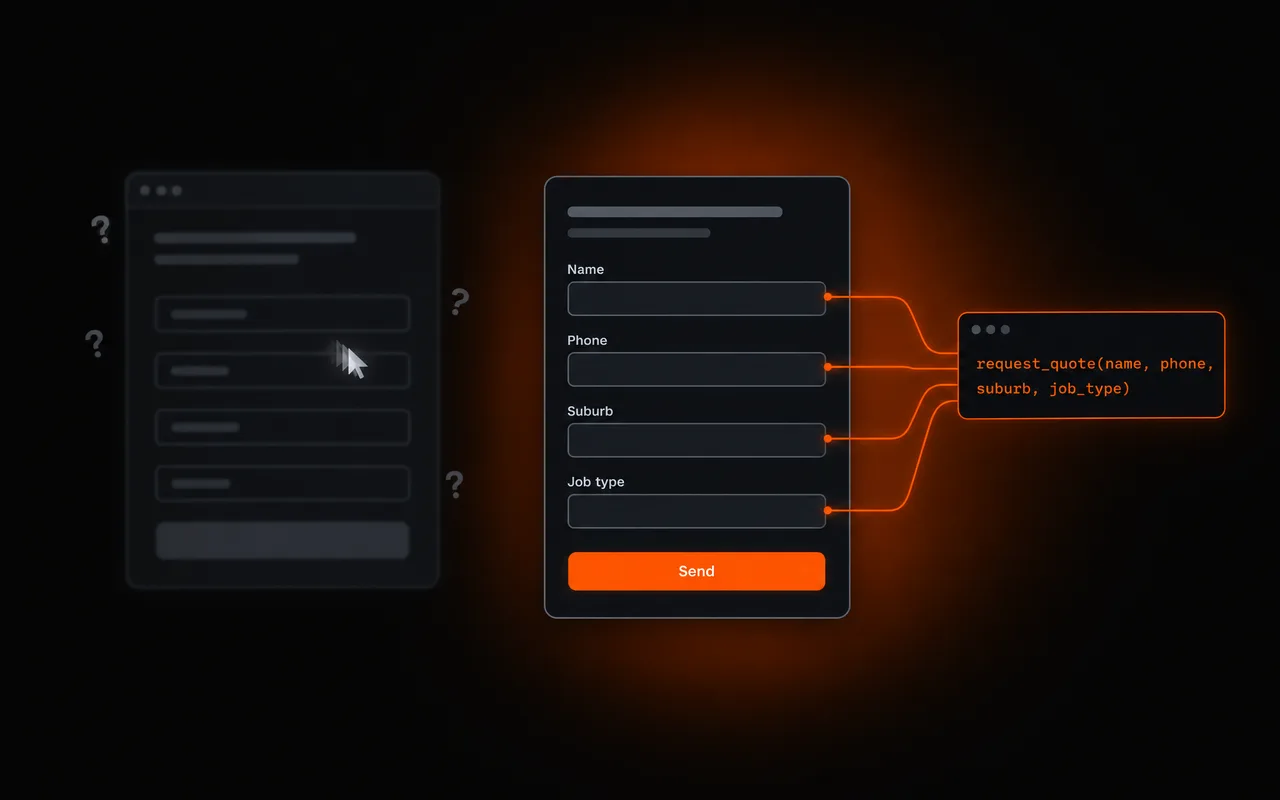

WebMCP is a proposed web standard, now in a Chrome origin trial, that lets a website tell AI agents exactly what its forms and tools do, so an agent can use them properly instead of guessing.
- Today, AI agents use websites by reading the page and simulating clicks and typing. It is slow and it breaks easily.
- WebMCP lets a site declare tools: a quote form can be labelled as a quote request tool, with each field described.
- Simple forms need only a few extra HTML attributes. More complex features can be registered as tools in JavaScript.
- Lighthouse now has an experimental Agentic Browsing category that checks WebMCP tools, accessibility labels, layout stability and llms.txt.
- WebMCP supports agent interaction, not Google rankings. Google Search ignores llms.txt; useful content and crawlability still matter.
- Every site we build from here is WebMCP ready as part of Living Sites, Web Blend's system for sites that keep improving.
Keep asking about it in
Quick answer: WebMCP is a proposed web standard from the Chrome team that lets your website tell AI agents exactly what its forms and features do. Right now, when someone asks an AI assistant to “get me a quote from a local plumber”, the agent has to read the page and click around like a person would, guessing which box is the suburb and which button sends the form. WebMCP replaces the guessing with a clear label: this form requests a quote, and here is what each field means. It launched in May 2026 as an origin trial in Chrome 149, and Lighthouse now has an experimental category that scores sites on it. It is early. It is also where websites are clearly heading, and every site we build from here is WebMCP ready.
The problem WebMCP fixes
AI agents are starting to do things on websites on behalf of people: book appointments, fill in forms, compare prices. Google’s name for the way they currently do it is actuation: the agent simulates mouse clicks and typing, “as though it were the human user engaging with your website.”
Think of it as sending a new apprentice to a job with no instructions. They will probably work out which tap is the hot one, but they will be slow, they will get it wrong sometimes, and if someone moves the taps around they are lost again. An agent filling in a quote form the same way can misread a field, trip over a popup or give up when the layout changes, and your lead goes nowhere.
WebMCP gives the apprentice the job sheet. The website declares its tools, describes the inputs each one expects using a JSON schema, and shares what state the page is in. The agent stops guessing and uses the tool as intended.
See the difference
The Chrome team made a short video showing an AI agent booking an appointment on the same page, once without WebMCP and once with it:
Google’s interactive version uses a consultation booking widget. We built our own version around the thing that actually matters to a trade business: a quote request. Both agents get the same job from a customer. Press Run agent and watch them go.
The agent on the left is not badly built. It is doing its best with a page that gives it nothing to go on: placeholder text instead of labels, a dropdown with no matching option, a date field with a hidden format, a discount popup and an unlabelled send button. Every one of those is common on template trade websites, and every guess is a chance for your lead to arrive wrong or not at all. The agent on the right never has to guess, and the customer still checks the details and presses Send themselves.
How it works, in plain terms
There are two ways to make a site WebMCP ready, and most trade websites only need the first.
The declarative way: label your forms. A normal HTML form becomes a tool by adding a toolname and a tooldescription, plus a toolparamdescription on each field. This is roughly what the quote form on the right of the demo looks like:
<form toolname="request_quote"
      tooldescription="Request a quote from a local plumber. The customer checks the details and presses Send.">
  <label for="suburb">Suburb</label>
  <input id="suburb" name="suburb" required
         toolparamdescription="Suburb where the job is, for example Parap">

  <label for="job_type">Job type</label>
  <select id="job_type" name="job_type" required
          toolparamdescription="The kind of plumbing job">
    <option value="blocked_drain">Blocked drain</option>
    <option value="hot_water">Hot water</option>
    <option value="leak">Leaking tap or pipe</option>
  </select>

  <label for="preferred_time">Preferred time</label>
  <input id="preferred_time" name="preferred_time"
         toolparamdescription="When the customer wants the plumber, for example Thursday 7am to 9am">

  <button type="submit">Send quote request</button>
</form>
Unless the form opts in to automatic submission, the agent fills it in and the person still presses submit, which is exactly what you want on a lead form: the customer checks the details before anything reaches you. Sites can also show visual feedback while an agent is filling a form, and tell whether a submission came from an agent or a person.
The imperative way: register tools in JavaScript. For anything that is not a simple form, such as a price calculator, a booking calendar or a product builder, a developer registers a tool in code with a name, a description, an input schema and a function that does the work. The get_available_times tool from the demo would look something like this:
document.modelContext.registerTool({
  name: 'get_available_times',
  description: 'List the open booking windows for a given day.',
  inputSchema: {
    type: 'object',
    properties: {
      day: { type: 'string', description: 'Day of the week, for example Thursday' },
    },
    required: ['day'],
  },
  annotations: { readOnlyHint: true },
  execute: async ({ day }) => getOpenWindows(day),
});
That readOnlyHint tells the agent the tool only looks things up and changes nothing. Tools can also be flagged as having real-world consequences, so the agent knows when to slow down and check with the person.
Security is built in from the start. Tools only work on the site’s own origin by default, and embedding them across sites needs explicit permission.
WebMCP is not the same as MCP
You may have heard of MCP, the Model Context Protocol that lets AI tools connect to things like your CRM or job management software. Google’s comparison puts it simply: MCP is for the backend, WebMCP is for the frontend. MCP runs on a server all the time. WebMCP lives inside your web page and only exists while someone has it open in their browser. They are partners, not competitors.
Lighthouse now scores sites for AI agents
The bit that makes this real for us is measurement. Lighthouse, the same tool that scores page speed and SEO, now has an experimental Agentic Browsing category. It needs Chrome 150 or later and it checks three things:
| Area | What Lighthouse checks |
|---|---|
| WebMCP integration | Whether the page registers WebMCP tools, which forms are missing the WebMCP attributes, and whether each tool’s schema is valid |
| Accessibility for agents | Whether buttons, links and fields have proper names and labels, and whether the accessibility tree is intact |
| Stability and discoverability | Layout shift (content jumping around as the page loads) and whether the site has an llms.txt file |
Unlike the familiar Lighthouse scores, there is no 0 to 100 number. You get a pass ratio: how many of the agent readiness checks your site passes, with pass or fail on each.
Notice how much of that list is not new at all. Agents read the same accessibility tree that screen readers use, so a button with no label blocks a blind visitor and an AI agent in exactly the same way. Layout shift annoys humans and confuses machines. In other words, a site that is properly built for people is most of the way there already. The sites that will struggle are the template sites with unlabelled icon buttons, form builders that inject messy markup, and pages that jump around while they load.
Where it is at, honestly
Both WebMCP and the Lighthouse category are experimental and based on proposed standards. The API is available through a Chrome origin trial and a developer flag, it is being discussed in the W3C, and details may change before it settles. Google’s own documentation notes it is designed for browser workflows with a person keeping an eye on things, not fully automated bots.
Agent interaction and search visibility are different questions. WebMCP can describe how a supported browser agent uses a form; it does not make Google recommend a business. Google’s AI search optimization guide says Google Search ignores llms.txt and requires no special AI markup. Keep useful content, crawlability and a good visitor experience as the search priorities. Our AI visibility checker assesses technical search foundations separately from agent interaction.
So nobody needs to rebuild their website this week because of WebMCP. But the direction is clear: AI assistants are becoming another way customers find and contact local businesses, and a site that tells them exactly how to request a quote will beat one that makes them guess. We have already seen a lead arrive at Web Blend through an AI assistant. That channel is small today and growing.
What we are doing about it: Living Sites
We are building a system called Living Sites: our approach to websites that keep improving after launch instead of sitting still until the next rebuild. Being ready for AI agents is part of that, and from here on every site we build is WebMCP ready. In practice that means:
- Every lead form is a declared tool. Quote, booking and contact forms carry a clear tool name, a description, and a description on every field, so an agent can fill them in correctly and the customer still confirms before sending.
- Calculators and interactive tools are registered in code where it makes sense, with the right read only or consequential flags.
- Every interactive element is labelled. No mystery icon buttons, no unlabelled fields. This was already our standard for accessibility, and now it counts twice.
- Stable layouts. Our sites are hand-coded and fast, with no content jumping around as they load.
- An optional llms.txt summary for services that choose to use that convention. Google Search ignores it, so it is not a ranking or AI-search eligibility feature.
- The Agentic Browsing audit becomes part of our pre-launch checks, alongside speed, SEO and accessibility, as the standard matures.
The cost of doing this at build time is small. Retrofitting it onto a template site later is not. If you are planning a new website, or wondering whether yours will hold up as AI assistants start doing the searching and the form filling for your customers, have a look at our Conversion Websites or see what a tradie website costs.