// GOOGLE BUSINESS PROFILE

Give us access to your Google Business Profile

We need access to keep your profile up to date. That means posting updates, replying to reviews, adding photos and connecting it to your website and ads.

You stay in control, you can remove our access any time.

// WHO CAN DO WHAT

The three roles, in plain English

Google gives every person on your profile one of three roles. Here is what each one means.

You keep this

Primary owner (you)

Google's description: Can edit, add people and transfer ownership of the Business Profile on Search and Maps

  • The main account holder for your profile. You keep this role when you add us.
  • Google says only the Primary owner can transfer primary ownership.
  • You can remove any owner or manager yourself, including us.
What we ask for

Owner (us)

Google's description: Can edit, add people and transfer ownership of the Business Profile on Search and Maps

  • Full admin access. Google gives owners full control: they can add or remove people and even remove the profile. That is why you keep Primary owner and only add people you trust.
  • We use it to manage your profile and add our own team without asking you each time.
  • Google adds a seven-day safety delay before any new owner can do the big admin jobs, like removing people or the profile.

Not enough for us

Manager

Google's description: Can make changes to the Business Profile on Google Search and Maps

  • Can make most changes: info, hours, photos, posts and reviews.
  • Can't add or remove people, and can't remove the profile.
  • Why it's not enough: we'd have to ask you every time we add someone to our team.

Owner is Google's word for admin. It does not make us the owner of your business. It is full admin access, so you keep the Primary owner role and only add people you trust.

Source: Google's help page on Business Profile owners and managers (opens in a new tab)

// HOW TO ADD US

How to add us

Six steps. It can look slightly different on a phone than on a computer, but the steps are the same.

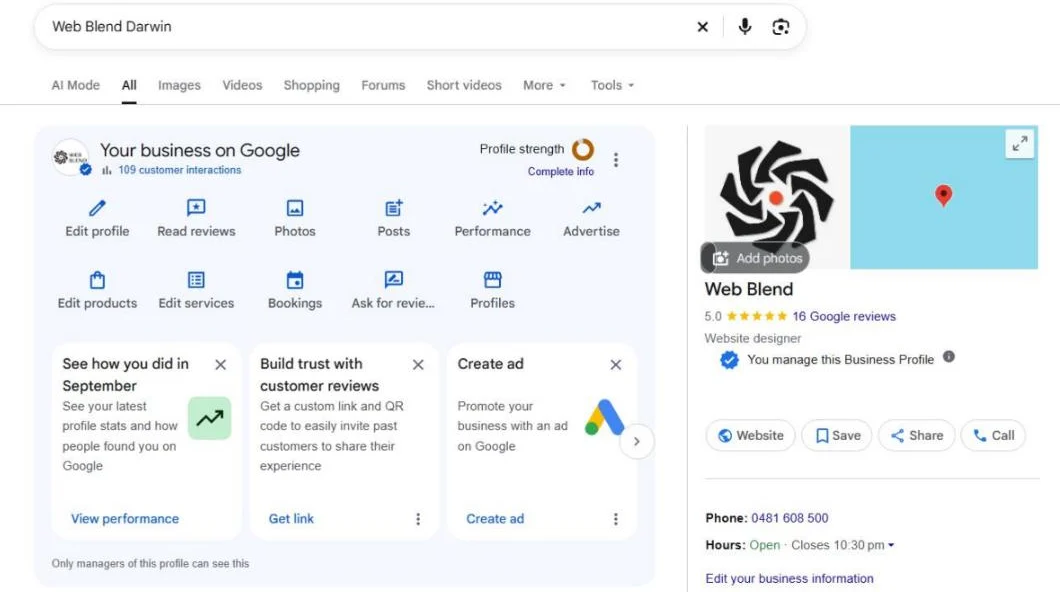
  1. Open your Business Profile

    Sign in to the Google account that manages your business. Then search your business name on Google, or go to business.google.com (opens in a new tab).

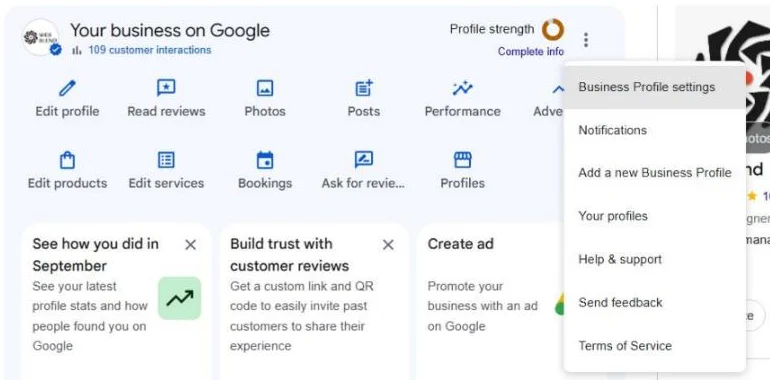
    Google search results for Web Blend, signed in, with the Your business on Google panel open.
  2. Go to People and access

    Select More (the three dots), then Business Profile settings, then People and access.

    The More menu on the Business Profile panel, with Business Profile settings at the top.
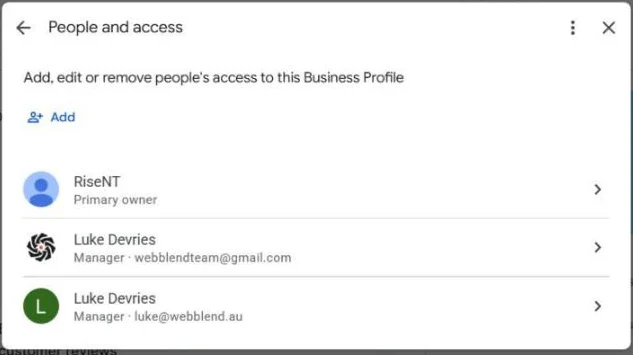
  3. Select Add

    At the top left, select Add.

    The People and access screen, with the Add button at the top left.
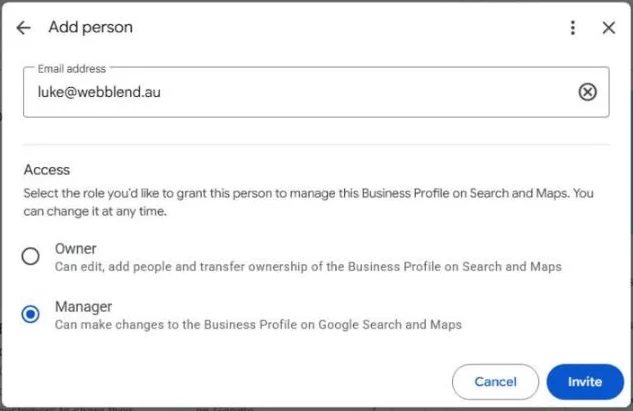
  4. Enter our email

    Type in this email address:

    [email protected]
    The Add person box with luke@webblend.au typed in the email field.
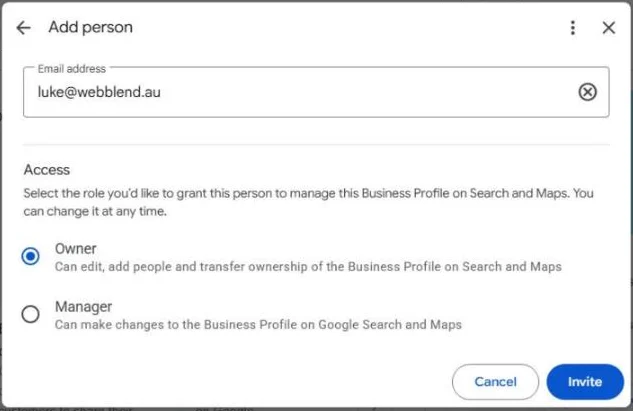
  5. Choose Owner, then Invite

    Under Access, choose Owner (not Manager). Then select Invite.

    The Add person box with Owner selected under Access, next to the Invite button.
  6. Let Luke know

    Text or call Luke to say it's done, and we'll accept the invite. Google emails you when we accept.

    Luke's mobile: Call 0481 608 500 or send a text

    The People and access screen, where everyone with access to the profile is listed.

// QUESTIONS

Common questions

Are you taking my profile?

No. You stay the Primary owner, and you can remove our access yourself. Owner is Google's word for admin access. It is full access, which is why you should only give it to people you trust. We use it to manage your profile and add our team without asking you each time.

Can I remove you?

Yes, any time. Go to People and access, select us, then select Remove person. Google sends us an email when we're removed. Replies and posts we've already made stay on your profile. One note: Google makes anyone who has only just become an owner or manager wait seven days before they can remove other people. If you were only recently made an owner yourself, you may need to wait out that week.

Why Owner and not Manager?

Managers can't add or remove people. With Owner access, Luke can add our team and his other work emails himself, without asking you every time someone new needs access.

Do you need my password?

No. Never share your Google password with anyone, including us. Google gives each person their own access through their own Google account.

What if I'm not the Primary owner?

You don't need to be. Any Owner on the profile can send the invite. If you're a Manager, ask an Owner to do it. If nobody knows who the owners are, call Luke and we'll help you work it out.

// NEED A HAND

Stuck? Call or text Luke on 0481 608 500

Or just reply to our email.