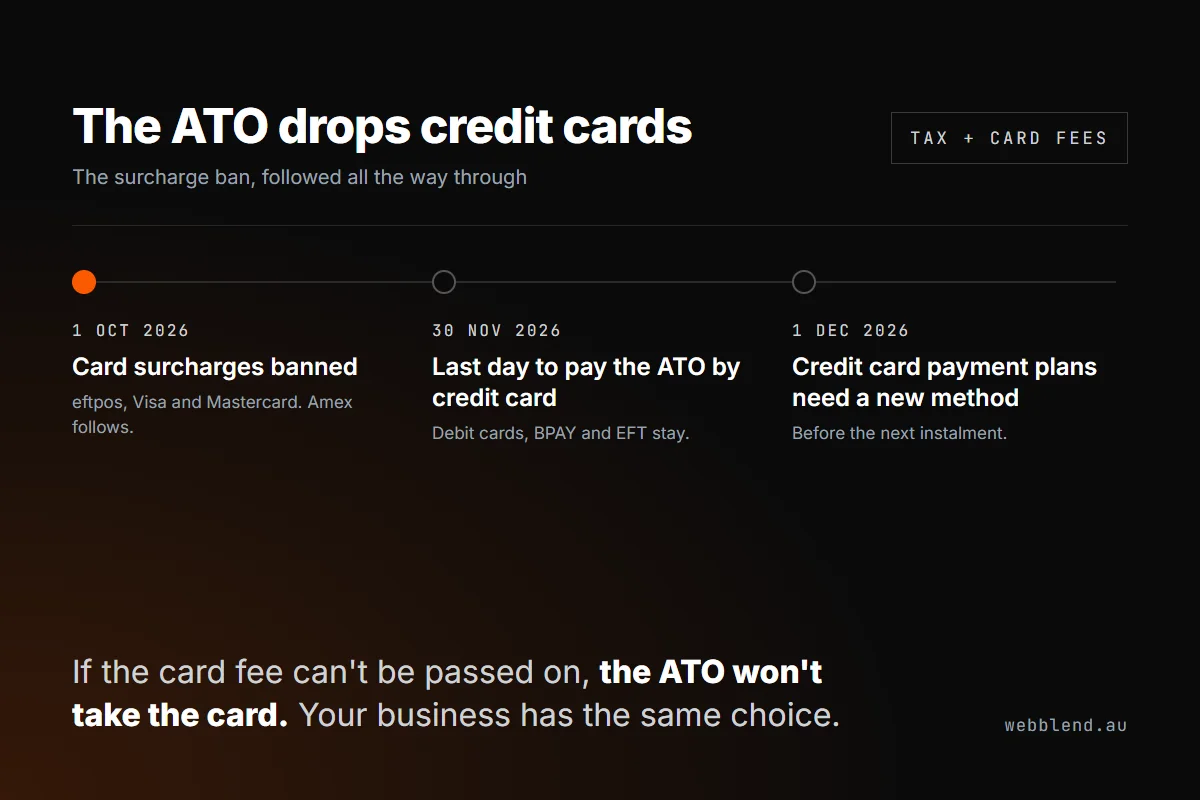

The ATO will stop accepting credit cards after 30 November 2026. It's a direct result of the card surcharge ban that started on 1 October: the ATO can no longer pass the card fee on, and it has decided not to absorb it. Trade businesses lose the option of paying tax by credit card, and should treat the ATO's move as a prompt to fix their own card terms.
- From 1 December the ATO takes no credit cards, including Visa, Mastercard and Amex. Debit cards, BPAY, EFT and direct debit stay.
- ATO payment plans linked to a credit card must switch to another method before the next instalment due after 30 November.
- The July to September BAS is due before the cut-off, so it's the last quarterly BAS most businesses can still put on a credit card.
- ServiceM8 stopped adding card surcharges automatically on 1 October and offers PayTo at 1% + 30c, a card limit and bulk price increases.
- ServiceM8 won't rewrite your words. Check quote and invoice template footers, custom Word templates, and email and SMS templates.
- Also remove surcharge wording from your website, T&Cs, Google Business Profile, booking forms and what your team says on site.
Keep asking about it in
Quick answer: After 30 November 2026 the ATO will stop accepting credit cards, including Visa, Mastercard and American Express credit cards. Debit cards, BPAY, bank transfer and direct debit still work. The ATO says it’s doing this because of the card surcharge ban that started today: it can no longer pass the card fee on to the person paying, and it doesn’t think taxpayers as a whole should cover it. For trade businesses, there are two things to deal with. You’ll need another way to pay your BAS and any payment plan. And if the ATO had to rethink how it takes card payments because of the ban, your quotes, invoices, T&Cs and website probably need checking too.
What the ATO announced
On 1 October 2026, the same day the surcharge ban took effect, the ATO published a media release titled ATO to stop accepting credit cards after 30 November 2026.
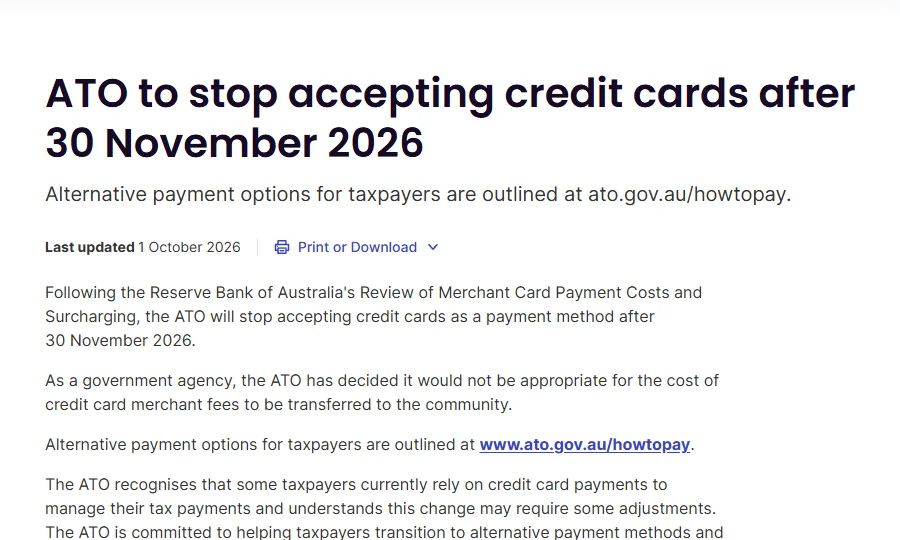
The key lines, quoted from the ATO media release:
- “Following the Reserve Bank of Australia’s Review of Merchant Card Payment Costs and Surcharging, the ATO will stop accepting credit cards as a payment method after 30 November 2026.”
- “As a government agency, the ATO has decided it would not be appropriate for the cost of credit card merchant fees to be transferred to the community.”
- Anyone with a payment plan on direct debit from a credit card “will need to update their payment method before their next instalment due after 30 November 2026”.
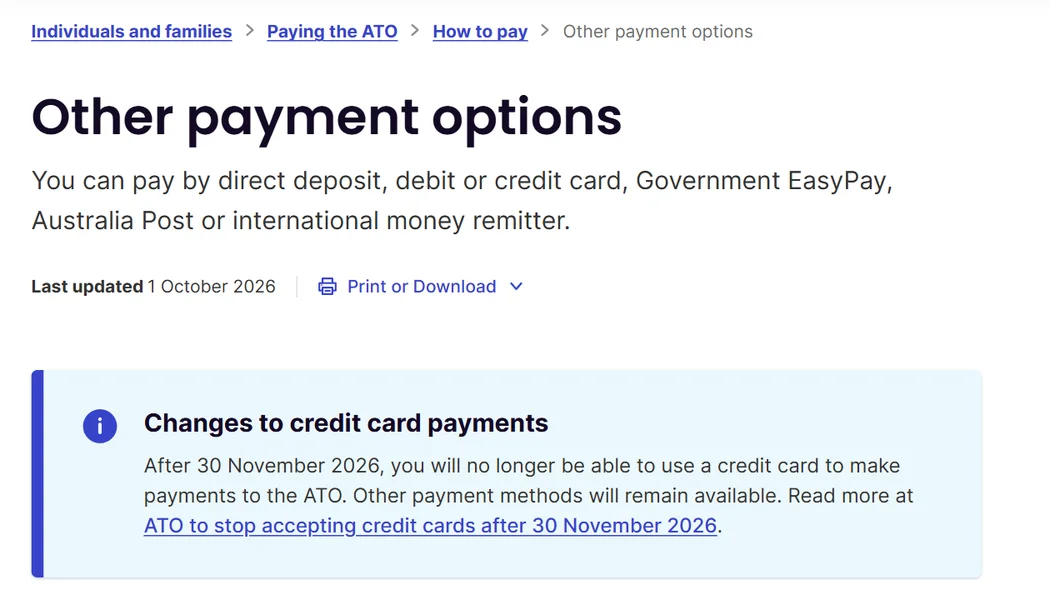
The ATO’s own payment page now shows a notice at the top:
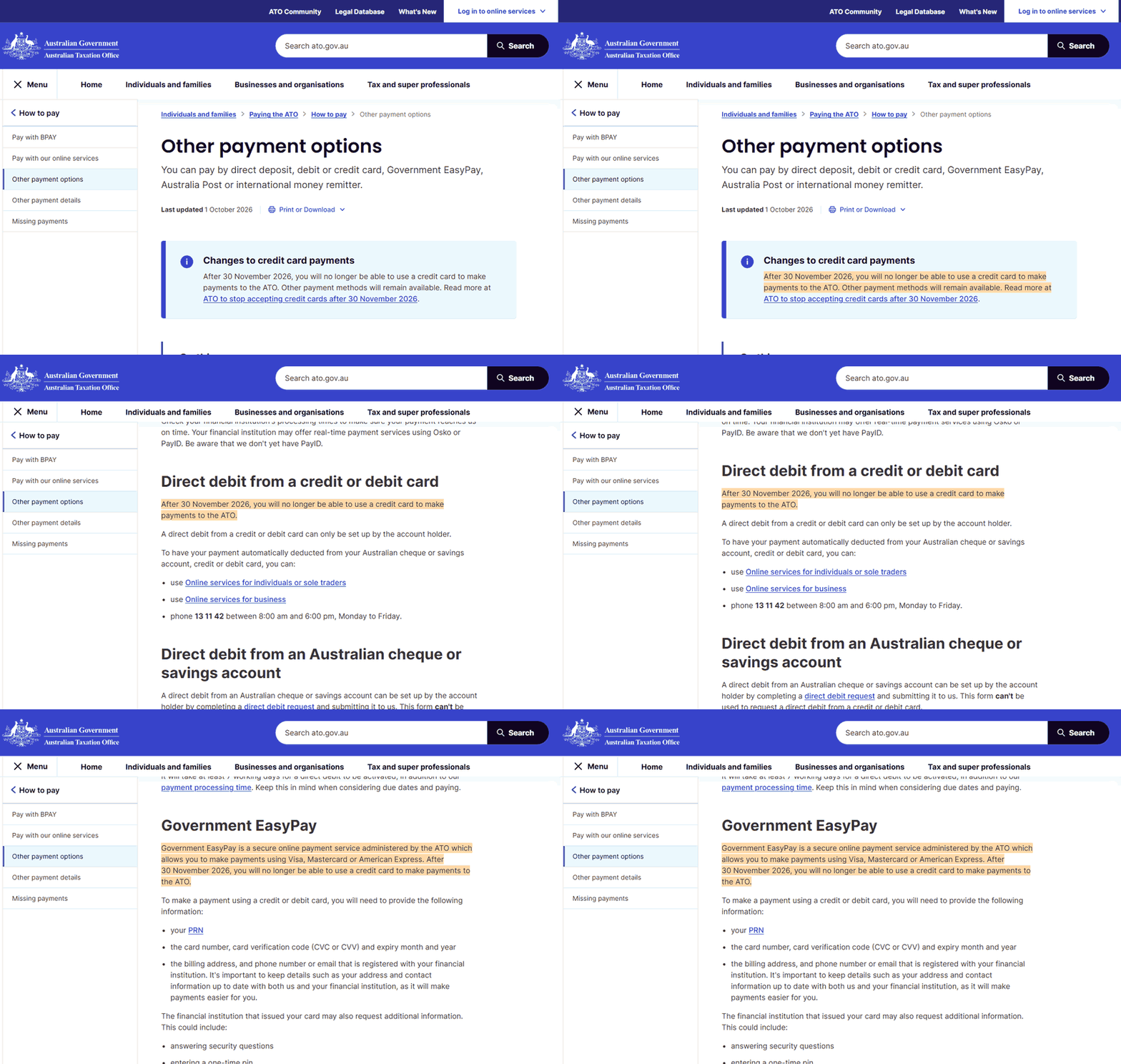
The same warning has been added to the two card sections further down the page: direct debit from a card, and Government EasyPay, which is the service the ATO uses to take Visa, Mastercard and Amex.
The ATO says only about 2.3% of tax payments were made by credit card in 2024–25, and more than 60% of those came from privately owned and wealthy groups and from public and multinational businesses. Those numbers don’t tell you how many small businesses pay by credit card, though, and plenty of trade businesses do it to get interest-free days or rewards points on a large BAS bill.
How the ATO ties into the surcharge ban
The ATO’s decision is the surcharge ban working the way the RBA intended. Here’s what happened:
- Before 1 October, any business could add a surcharge, so the customer covered the card fee.
- From 1 October, surcharges on eftpos, Visa and Mastercard are banned, and American Express has dropped them too. Whoever accepts the card now pays the fee.
- The ATO had two options. It could absorb the fee, which means every taxpayer pays for the few who use credit cards, or it could stop accepting credit cards. It chose the second.
Your business has the same two options, plus a middle one the ATO didn’t take: build the card fee into your prices. We covered the maths, and how to set up each option in ServiceM8, in our card surcharge ban guide for tradies. In short:
- Absorb it. The fee comes out of your margin on every card payment.
- Price it in. Raise prices by your real card cost (the card fee multiplied by the share of revenue paid by card), not the full 2%.
- Limit it. Do what the ATO did, but only on large invoices. Keep cards for small jobs and steer bigger invoices to PayTo or bank transfer.
How it affects trade businesses
Paying your own tax
If you pay your BAS, PAYG instalments or income tax on a credit card for interest-free days or points, that stops working after 30 November.
- Your July to September BAS is the last one on a credit card. Quarterly BAS for that period is due 28 October, or usually 25 November if a registered agent lodges it online. Both dates fall before the cut-off. Your October to December BAS will need another payment method.
- Payment plans need a new method. If you’re paying off an ATO debt by direct debit from a credit card, the ATO will write to you. Change it before your first instalment due after 30 November at ato.gov.au/managepaymentplan, or the plan can default.
- Cash flow changes. A credit card gave you up to 55 days before the money left your account. Debit card, BPAY or bank transfer takes it straight away. If you relied on that buffer, start putting BAS money aside each week now so you’re not caught short in February.
- Debit still works, and so do BPAY and EFT. The ATO says BPAY and its online services are the quickest ways to pay. It also notes it doesn’t have PayID yet, so use the BSB and account number with your payment reference number (PRN).
Getting paid by your customers
This is where most of the work is. Since 1 October you can’t add a fee because someone pays by card. Most job management software has already removed the automatic surcharge, but the words saying you charge a surcharge are still in your templates, on your website and in your T&Cs, unless someone has gone in and deleted them.
A customer who reads “3% card surcharge applies” on a quote they got in October, then pays by card without being charged, probably won’t care. But a tech who reads the T&Cs and charges the fee at the door is breaking the card scheme rules. A customer who’s heard about the ban and sees outdated wording may also start wondering what else on the quote isn’t current.
What ServiceM8 has set up
ServiceM8 got ready for the ban well ahead of time. According to its help centre guide to the card surcharge changes:
- Surcharges stopped automatically on 1 October. “If you have not already turned it off, ServiceM8 will stop applying it automatically on 1 October 2026.” This applies to ServiceM8 Pay and legacy Stripe payments.
- A preparation wizard for Australian ServiceM8 Pay accounts, in four steps: Start, Payment Options, Price Increase, Finish. You need Business Owner access and the online dashboard, not the app.
- PayTo, so customers can pay online invoices straight from their bank account. ServiceM8 charges 1% + 30c for PayTo, against 2.1% + 30c for a standard Australian card on the plan we checked.
- A card limit on online invoices. You can choose Always, or up to $500, $1,000, $2,000, $5,000, $10,000, $25,000 or $50,000. This is the closest match to what the ATO did. Cards stay available on small invoices and are hidden on big ones. The limit doesn’t apply to deposits, proposals, in-app payments, Scan & Pay, Tap to Pay or automatic payments.
- A bulk price increase for saved Items & Services. This can’t be undone, so export your price list first.

Here’s the wizard recorded in our own ServiceM8 account:
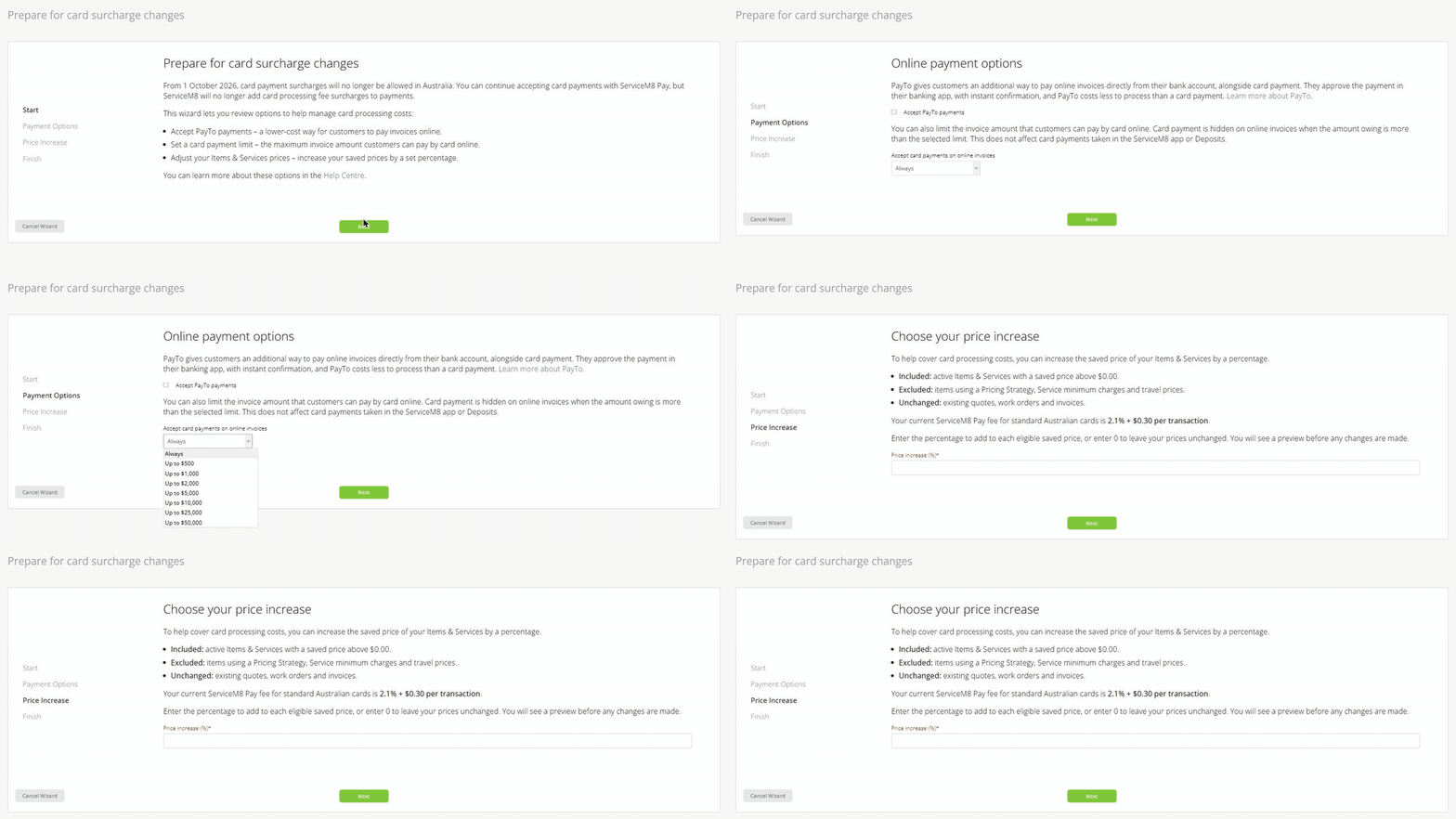
The full step-by-step walkthrough has a screenshot of every screen and covers what each setting includes and leaves out.
What ServiceM8 doesn’t do: change your wording. Its help guide covers payments, limits and prices, not template text. The surcharge clause you typed into a template a few years ago is still there.
Check your T&Cs everywhere they live
Do this once, properly, this week. For your website, our free Card Surcharge Checker scans up to 25 pages and shows every line of card fee wording it finds. For everything else, search for “surcharge”, “card fee”, “merchant fee”, “credit card”, “1.5%”, “2%” and “3%” in each of these places.
In ServiceM8
- Quote and invoice template footers. Many built-in ServiceM8 templates have a short Terms and Conditions statement in the footer, which you set in the template settings (ServiceM8 guide). Open every template you actually use, not just the default.
- Custom Word templates. If you’ve uploaded a custom template, your T&Cs may be on a separate page inside the Word file. Download it, edit it in Word and upload it again.
- Email and SMS templates. Invoice emails, payment reminders and overdue notices often say something like “card payments incur a 1.9% fee”.
- Proposals and job templates. Any reusable text block or checklist that mentions payment terms.
Using Tradify, Fergus, simPRO or AroFlo instead? The same four places apply. They’re just named differently.
Outside your job management software
- Your website. Check the contact page, FAQ, pricing page, footer, booking or quote request form, and any “terms of trade” page. To find stray mentions, search Google for
site:yourdomain.com.au surcharge. - Your written T&Cs. The payment clause in your terms of trade, credit application forms and any signed service or maintenance agreements you reuse.
- Google Business Profile and directories. Look at profile descriptions, the “from the business” section and any pinned posts.
- On site and in the van. Stickers on the card machine, the price sheet techs carry, and what techs say when they take payment at the door.
What to replace it with
Delete the surcharge line and replace it with something that tells customers how they can pay. For example:
Payment is due within 7 days of invoice. We accept bank transfer, PayTo and card. Card payment is available on invoices up to $5,000.
Change the limit to match whatever you set in ServiceM8, and have your accountant or lawyer check the full T&Cs. Don’t phrase a price rise as “due to card fees”. That’s just a surcharge with a different label. It’s fine to say your prices now include all payment methods.
The short version
- Your own tax: your July to September BAS can still go on a credit card. After 30 November, use debit, BPAY or EFT, and move any credit card payment plan before the next instalment.
- Your customers: ServiceM8 already stopped the surcharge. Use the wizard to switch on PayTo and set a card limit, the same way the ATO has limited card payments.
- Your paperwork: search for and remove “surcharge” from template footers, Word templates, email and SMS templates, your website, your T&Cs, your Google profile and the van.
If you’d like this handled for you, our automation work covers quote and invoice templates, payment follow-ups and the website wording, so they all match. We don’t sell payments, so we don’t mind how your customers pay. We just make sure your paperwork matches what you actually charge.
Checked on 1 October 2026 against the ATO media release and Other payment options page (both last updated 1 October 2026), ServiceM8’s help centre articles on card surcharge changes and template terms and conditions, and the ServiceM8 wizard in our own account. This is general information, not tax advice. Check BAS due dates and payment plan changes with your registered tax agent.