// CASE STUDY · Plumbing
The Scanner Said Clean
// THE BRIEF
What they came to us for
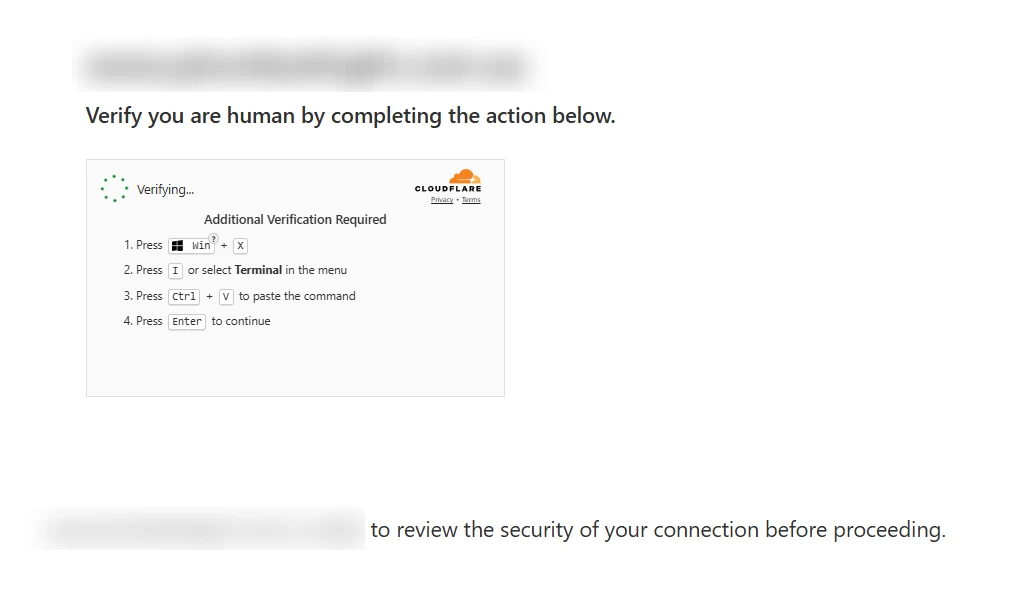
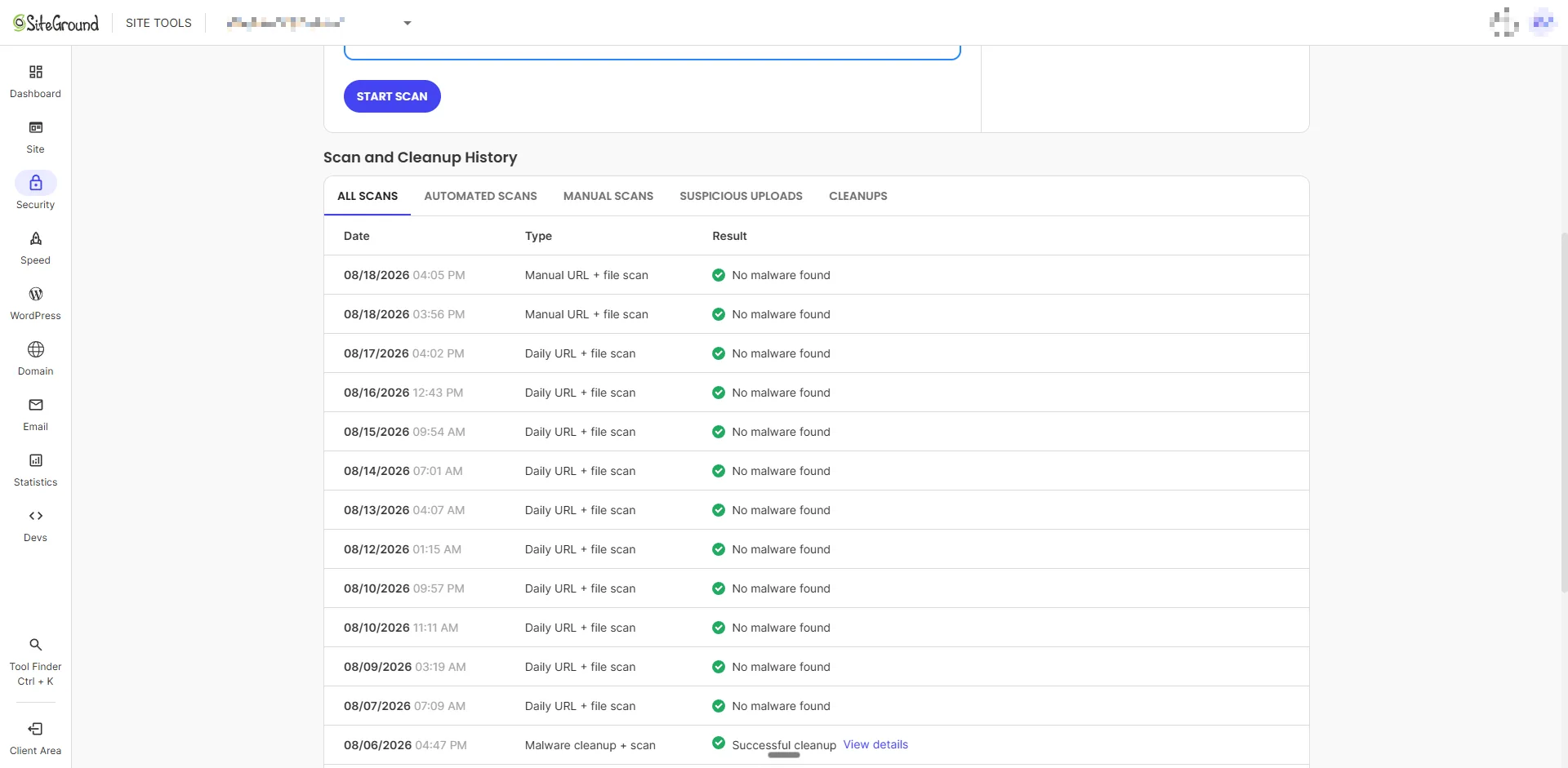
We publish this one without the client's name, for obvious reasons. They run a plumbing business, and their WordPress site started showing visitors a full-screen Cloudflare-style check telling them to open Windows Run or Terminal and paste a command. That is not a security check. It is a ClickFix-style social-engineering trap that tricks visitors into running the attacker's next stage on their own computer. The awkward part was the hosting dashboard: SiteGround's Site Scanner reported no infection while that screen was still being served. The scanner never picked the malware up. Finding it meant going into the site by hand and hunting it down.
// WHAT WE DID
The investigation, step by step
-
Preserve the evidence
The infected browser tab was the first reliable witness, so we kept it open instead of refreshing it away. A refresh could have destroyed the only direct proof of what real visitors were being served.
Inspection showed the genuine homepage still loading underneath a fixed, full-screen overlay. The malicious code had built its own isolated page layer, stacked it above everything else and dressed it up as a Cloudflare verification step.
-
Work out why the scanner saw nothing
The overlay's loader was built to dodge inspection. It filtered out crawlers, command-line tools and common WordPress endpoints, then fetched changing JavaScript from external infrastructure and injected the response into the page. A signature scanner is strongest when the payload sits on disk as a recognisable file. Here, part of the behaviour arrived at runtime, and automated visitors were deliberately served something different from real ones.
The scan result was not fabricated. It was answering a narrower question than the one that matters: what are customers actually seeing?
-
Rule out the usual injection points
Four searches, four dead ends, and every one of them useful. The negative results pushed the investigation towards code that generated or retrieved the payload at runtime.
- wp database, every table ......... no match
- public tag manager container ..... no match
- active theme header .............. clean
- public files, plain-text sweep ... no match
-
Find the plugins wearing disguises
Server-side inspection found two plugins with legitimate-looking names. One posed as a familiar backup tool and pulled changing JavaScript indirectly from an external smart-contract data source, executing the result in visitors' browsers. The other posed as a security plugin and had created a concealed administrator account, ready to restore access after any visible cleanup.
Remnants of an earlier infection the host had caught a few weeks prior were still sitting in the plugin directory too. A folder named after a security product is not evidence that the code inside it is legitimate.
-
Remove the malware and its way back in
The cleanup took out the payload and every persistence mechanism the investigation had identified, and kept the evidence intact in restricted quarantine instead of destroying it. The temporary SSH key used for the investigation was deleted afterwards, and the removal retested.
- malicious plugins ........ quarantined
- hidden admin account ..... removed
- security salts ........... rotated
- active login cookies ..... killed
- caches + transients ...... cleared
- temporary ssh key ........ deleted
-
Prove it clean in a real browser
A fresh browser session loaded the normal homepage. The fake verification layer was gone, and the known malicious indicators were absent from the page being delivered to visitors.
Cleanup is not complete when a file disappears. It is complete when the public behaviour changes and the persistence checks come back clear.
-
Leave it harder to fool next time
One thing we will not do is pretend to more certainty than we have. The delivery and persistence mechanisms were verified; the original entry path was not conclusively established, and we say so.
That honesty shapes the follow-up. The site now runs the host's activity logging at maximum retention plus a permanent audit logger we built, recording plugin changes, administrator changes, logins, outbound requests and file integrity. Records are stored outside the public web root, with passwords and customer data deliberately excluded. Independent integrity monitoring and daily off-server log copies are scheduled next, so if anything like this happens again, the evidence trail survives it.
// EVERYTHING WE SHIPPED
What they got
The investigation
- Live infection preserved and inspected in the browser, not just on disk
- Database, tag manager, theme and file checks to rule out the common injection points
- Recent file-change review to narrow the suspect plugins
- Two disguised plugins identified as the delivery and persistence layers
The cleanup
- Malicious plugins deactivated and quarantined outside the public site
- Concealed administrator account and its persistence records removed
- Security salts rotated, forcing every existing login to re-authenticate
- Caches and transients cleared, temporary investigation access removed and retested
The audit trail
- Host activity logging switched on at its maximum retention
- Permanent audit logger installed: plugin changes, admin changes, logins, outbound requests, file integrity
- Log records privacy-minimised and stored outside the public web root
- Independent integrity monitoring and daily off-server log copies scheduled as follow-up
// UNDER THE HOOD
The scan history that said clean
// RELATED WORK
WordPress malware investigation and cleanup
If visitors are seeing redirects or overlays, the cleanup service explains the investigation, repair and verification process.
WordPress malware investigation and cleanup →// BEFORE & AFTER
The difference
One pair of shots tells the story. The before capture is the preserved evidence of what a normal visitor got while the malware scan said clean. The after capture is a fresh browser session once the cleanup was done.
Public homepage, real browser session

Both captures are from the day of the incident. The domain is blurred in the before shot, and the after shot is cropped above the content that identifies the business.
Investigated, cleaned and verified in a single day in August 2026. The client is anonymised throughout, and the evidence shots are redacted for the same reason.
// SERVICES USED
What went into this build
// READY WHEN YOU ARE
Let's get your phone ringing
Tell us about your business and the jobs you want more of. We'll come back with a plan and a price. No pressure, no jargon.
Get a quote